
Instant Guide to Detecting Windows Slowdown Issues

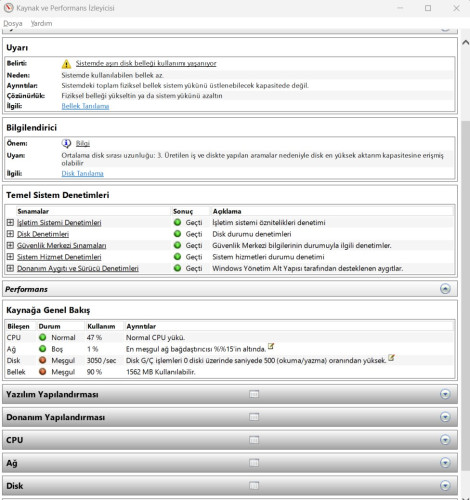
To understand the cause of sudden slowdowns on your Windows computer, the Run Window (Win + R) Thanks to the generated performance report, you can clearly see why the computer is freezing, which hardware is creating a bottleneck, or which software is straining the system. Particularly high RAM usage, disk delays, or applications that constantly keep the processor busy are clearly indicated in this report. This way, you can identify the source of the problem before going to technical support and take the right steps, such as closing unnecessary programs, cleaning the disk, or upgrading hardware.perfmon /report command is a very practical and effective solution. When you open the Run window (Win + R) and enter this command, Windows analyzes your system in detail for 60 seconds. During this analysis, CPU usage, RAM consumption, disk performance, and background services are examined in detail, and a readable report is presented to the user.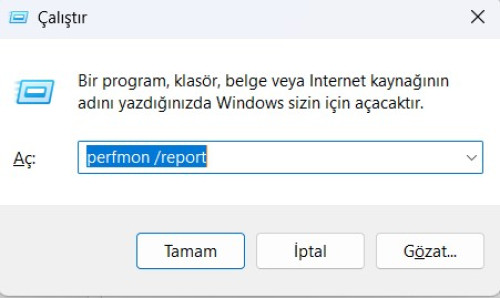
Perfmon /report is one of Windows' lesser-known but powerful system diagnostic tools. It provides a fundamental starting point for Windows troubleshooting, system analysis, and PC speed-up. Using this method at regular intervals is highly beneficial for improving your computer's performance and noticing issues early on.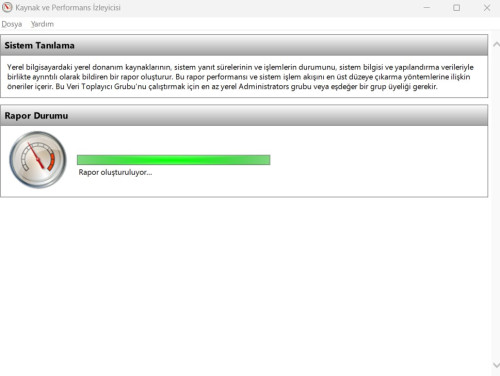
Alakalı İçerikler
-
How Many GB of RAM Does Your Computer Support? The Secret Way to Learn Without Programs 6 Ay önce
Before buying new RAM for your computer, learn the maximum RAM support of your motherboard. Discover step by step how to find out the maximum RAM capacity quickly and without programs using the Windows CMD command system.

-
How to Add Seconds to the Clock Area in Windows 11? 8 Ay önce
In its default settings, the clock on the Windows 11 taskbar only shows the hour and minute. However...

-
Windows’ta İşlemci Performans Ayarları - Memory Management Agent (MMAgent) İşlevi 10 Ay önce
Windows işletim sisteminde bellek yönetimi, sistem performansını doğrudan etkileyen en önemli unsurlardan biridir. Bu yönetimi optimize etmek amacıyla Microsoft, Windows 8 ve sonraki sürümlerde Memory Management Agent (MMAgent) bileşenini devreye almıştır.

-
Windows da Hayalet Klasör (Gizli ve Görünmeyen) Nasıl Yapılır? 1 Yıl önce
Kişisel dosyalarınızı saklamanın en yaratıcı yollarından biri, bir hayalet klasör oluşturmaktır. Bu tür klasörler, görünmez olup genellikle bilgisayarın başka bir kullanıcısı tarafından fark edilmez. Windows işletim sisteminde birkaç basit adımla görünmez ve gizli bir klasör oluşturabilirsiniz.

-
Tüm Windows'larda God Mode Etkinleştirme ve Özellikleri 1 Yıl önce
Windows God Mode, kontrol paneli ayarlarını bir listede açıkça görüntüler ve merkezi bir masaüstü kısayolu aracılığıyla erişimi basitleştirir. Windows God Mode'un nasıl etkinleştirileceğini ve bununla neler başarabileceğinizi açıklıyoruz.

- Windows Yavaşlama
- Perfmon Report
- Windows Performans Analizi
- Bilgisayar Kasma Sorunu
- Sistem Tanılama
- Windows Hata Çözümü
- Pc Hızlandırma
- Windows Performans Raporu
Show your reaction
- 2
- 2
- 0
- 0
- 0
- 0
- 0
- 0
- 0
- 0
- 0
- 0
- 0
- 0
- 0
- 0


Comments
Add your comment