
Instant Guide to Detecting Windows Slowdown Issues

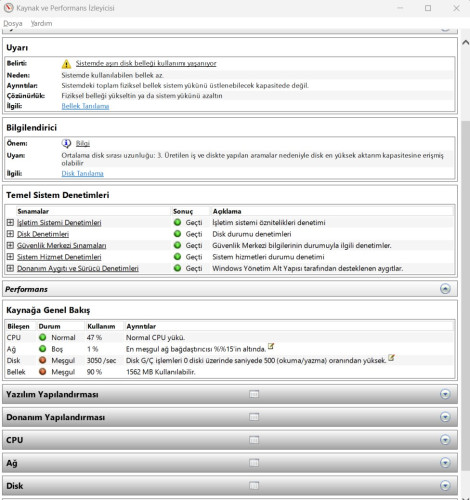
To understand the cause of sudden slowdowns on your Windows computer, the Run Window (Win + R) Thanks to the generated performance report, you can clearly see why the computer is freezing, which hardware is creating a bottleneck, or which software is straining the system. Particularly high RAM usage, disk delays, or applications that constantly keep the processor busy are clearly indicated in this report. This way, you can identify the source of the problem before going to technical support and take the right steps, such as closing unnecessary programs, cleaning the disk, or upgrading hardware.perfmon /report command is a very practical and effective solution. When you open the Run window (Win + R) and enter this command, Windows analyzes your system in detail for 60 seconds. During this analysis, CPU usage, RAM consumption, disk performance, and background services are examined in detail, and a readable report is presented to the user.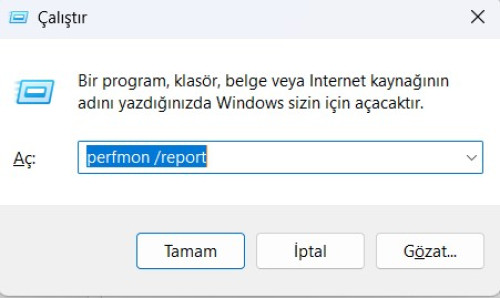
Perfmon /report is one of Windows' lesser-known but powerful system diagnostic tools. It provides a fundamental starting point for Windows troubleshooting, system analysis, and PC speed-up. Using this method at regular intervals is highly beneficial for improving your computer's performance and noticing issues early on.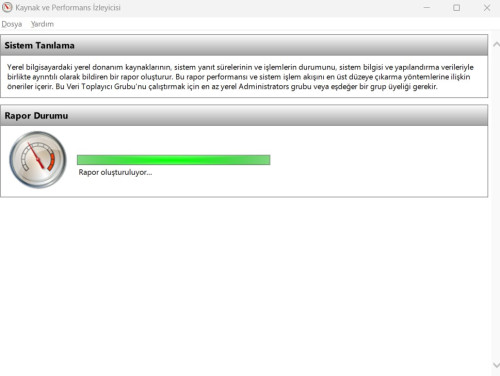
- Windows Yavaşlama
- Perfmon Report
- Windows Performans Analizi
- Bilgisayar Kasma Sorunu
- Sistem Tanılama
- Windows Hata Çözümü
- Pc Hızlandırma
- Windows Performans Raporu
Tepkini Göster
- 0
- 0
- 0
- 0
- 0
- 0
- 0
- 0
- 0
- 0
- 0
- 0
- 0
- 0
- 0
- 0


Yorumlar
Sende Yorumunu Ekle